Introducing Monolithic Harmonizer!
To describe what this tool is, it’s better to first describe what it is NOT.
This tool is NOT to replace the skill of playing harmonies on a keyboard. This tool is meant to overcome a real limitation in playing or writing section harmonies. That is, when playing piano, you cannot easily or naturally play legatos, trills, skips, or any other monophonic aspects of an acoustic instrument that VSTs like Acoustic Samples, Sample Modeling, and SWAM Modeling do so well.
What Monolithic Harmonizer does is it takes a MIDI input and outputs full harmonies either below or above that input. It duplicates the performance to different ports, keeping the monophonic qualities of each voicing. Each voice you add, it occupies the next port. For example, a four-part harmony (including the lead part) that occupies four ports, meaning each instrument in the section will be assigned its own port.
Windows users will want to install loopMIDI and designate that port for the output in Monolithic Harmonizer. The input will of course be your MIDI controller. For Mac users, inside the Audio MIDI Studio, you will use an IAC Driver port for the output. Then that loopMIDI or IAC port will be the modified MIDI signal that you will use as an input for your VSTs.
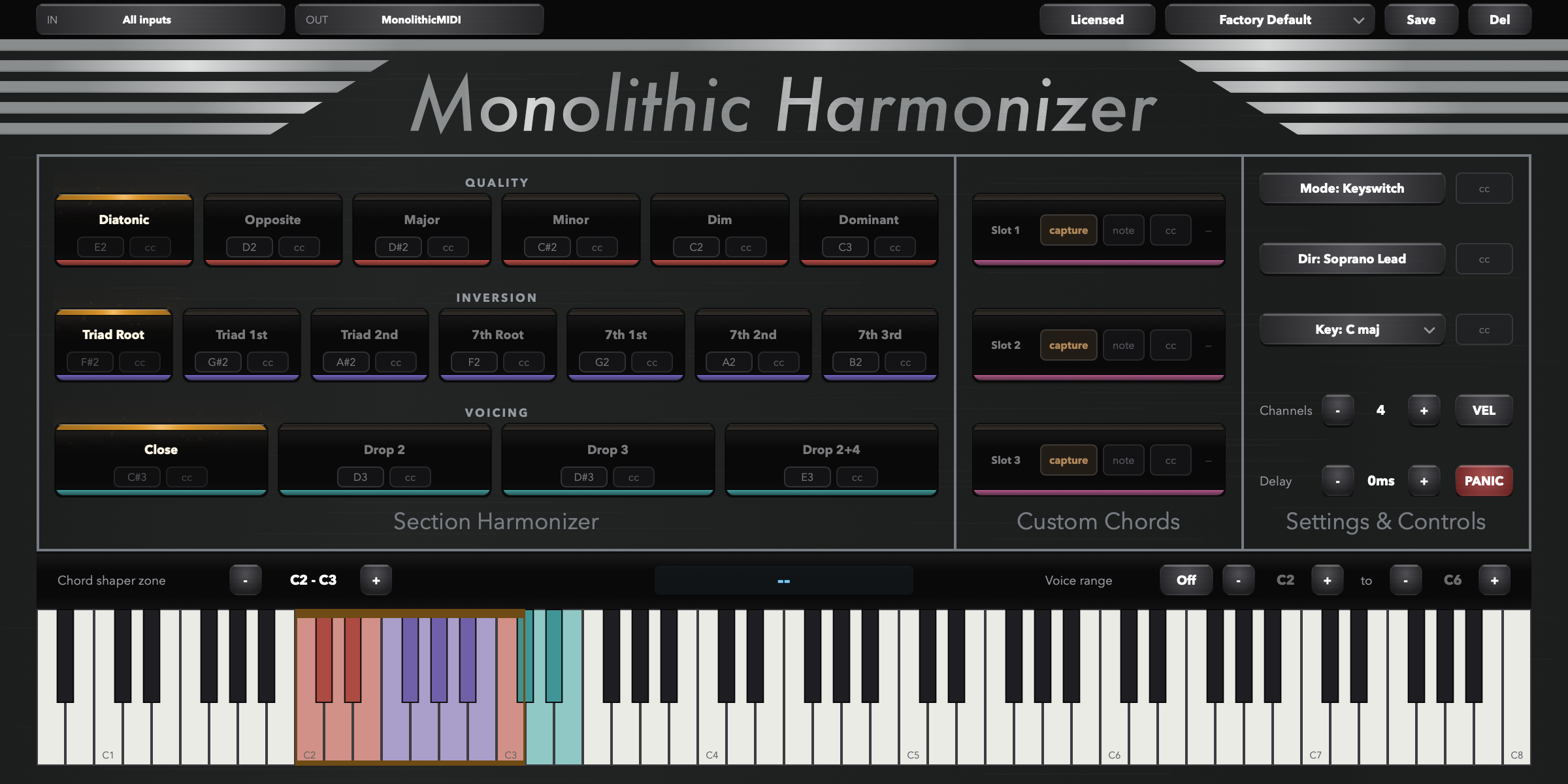
There are two methods by which this program allows you to choose your chords. There is the Keyswitch mode, which you will see occupies most of the window with color-coordinated functions (quality, inversion, voice); this mode allows you to switch between these functions with just a keyswitch or CC. The second method is something called Chord Shaper, where you are designated an octave range on the keyboard to hold down the very chord you wish to play, and that shape will be placed on top or below the input performance.
Important to note: I don’t plan to use this website for very long (the domain will be the same), I hope to redesign everything and not use SquareSpace. I also have plans to revamp this product and make it a lot more polished, but I’m releasing it now to hopefully gain incentive and learn how people will use it. Enjoy!
Introducing Monolithic Harmonizer!
To describe what this tool is, it’s better to first describe what it is NOT.
This tool is NOT to replace the skill of playing harmonies on a keyboard. This tool is meant to overcome a real limitation in playing or writing section harmonies. That is, when playing piano, you cannot easily or naturally play legatos, trills, skips, or any other monophonic aspects of an acoustic instrument that VSTs like Acoustic Samples, Sample Modeling, and SWAM Modeling do so well.
What Monolithic Harmonizer does is it takes a MIDI input and outputs full harmonies either below or above that input. It duplicates the performance to different ports, keeping the monophonic qualities of each voicing. Each voice you add, it occupies the next port. For example, a four-part harmony (including the lead part) that occupies four ports, meaning each instrument in the section will be assigned its own port.
Windows users will want to install loopMIDI and designate that port for the output in Monolithic Harmonizer. The input will of course be your MIDI controller. For Mac users, inside the Audio MIDI Studio, you will use an IAC Driver port for the output. Then that loopMIDI or IAC port will be the modified MIDI signal that you will use as an input for your VSTs.
There are two methods by which this program allows you to choose your chords. There is the Keyswitch mode, which you will see occupies most of the window with color-coordinated functions (quality, inversion, voice); this mode allows you to switch between these functions with just a keyswitch or CC. The second method is something called Chord Shaper, where you are designated an octave range on the keyboard to hold down the very chord you wish to play, and that shape will be placed on top or below the input performance.
Important to note: I don’t plan to use this website for very long (the domain will be the same), I hope to redesign everything and not use SquareSpace. I also have plans to revamp this product and make it a lot more polished, but I’m releasing it now to hopefully gain incentive and learn how people will use it. Enjoy!